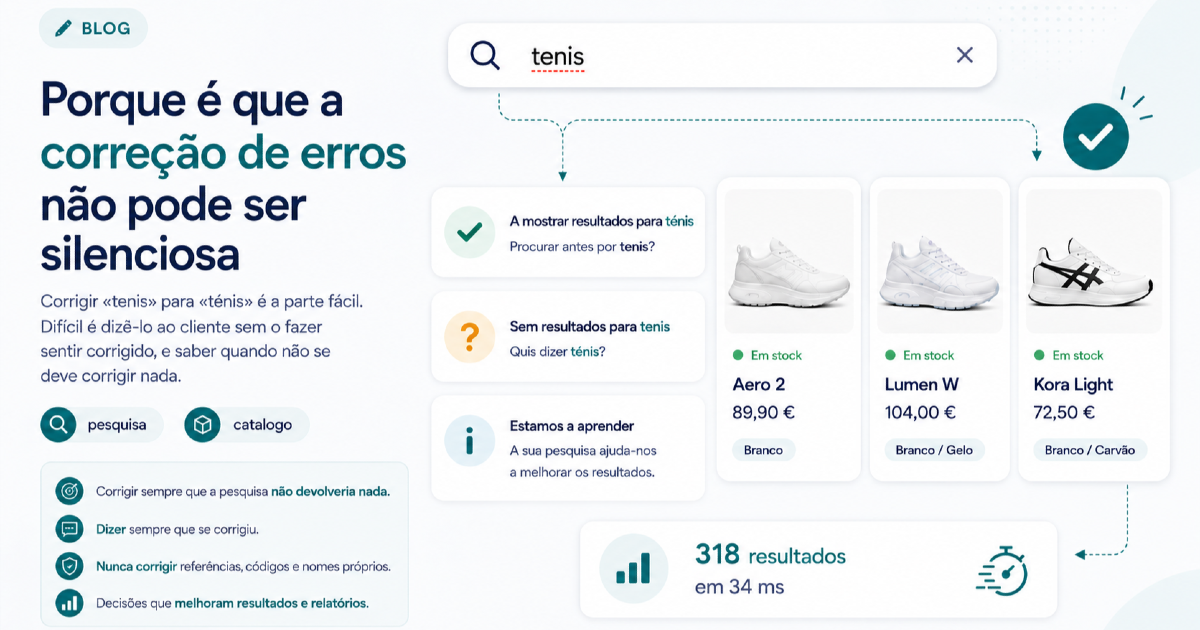
In short
- Correcting a spelling mistake is easy; deciding whether to tell the customer is what separates a good search from a search that confuses.
- There are three possible behaviours, and each one fails in a different way: silent, with a warning, or with a suggestion.
- References, product codes and proper names are the territory where correcting breaks more than it fixes.
- The rule we use: always correct when the search would return nothing, and always say that you corrected.
Almost everybody misspells something in the search box. An accent goes missing, a letter gets swapped, the phone corrects what it shouldn't. Some platforms ask for every mistake to be anticipated and written by hand into a list, which is the case with PrestaShop's native search. The store's search has to cope with that, and today almost all of them do: the edit distance between "trainrs" and "trainers" is one character, and any modern engine handles that part without help.
The hard part comes next, and it's a product question rather than an engineering one: should the customer know they were corrected?
What happens when you don't say anything
A silent correction is the simplest to implement and the one that looks best in a demo. The visitor types "samsug", gets Samsung phones, and nobody complains.
The problem shows up in the cases where the correction is wrong. The visitor types "ceramica" with induction hobs in mind and gets crockery, with no hint that the engine decided to look for something else. On the other side, the conclusion isn't "the search corrected me badly". It's "this store hasn't got what I'm looking for".
That's the hidden cost of silent correction: it turns a mistake by the engine into a judgement about the catalogue. And since the customer doesn't know there was a correction, they can't undo it either.
Three behaviours, three costs
| Behaviour | What the customer sees | Where it fails | When it makes sense |
|---|---|---|---|
| Correct in silence | Results, with no explanation | A wrong correction reads as a poor catalogue | Never, on its own |
| Correct and say so | "Showing results for trainers. Search for trainrs instead?" | It takes up a line above the grid | When there were no results without the correction |
| Suggest without correcting | "No results. Did you mean trainers?" | It costs a click and an empty page | When the original term has legitimate results |
The third row is the one most stores use by default, and it's the worst of the three in the most common case: showing an empty screen to somebody who mistyped one letter is making the customer pay for the mistake with an extra click, when the engine already knew the answer. The no results screen is, as it happens, where most stores fail: in the Baymard Institute search benchmark, close to half of the sites reviewed offer no way at all to recover from an empty search.
When correcting is the wrong call
There's a set of searches where any correction is a risk, and they all have the same characteristic: what was typed isn't a word, it's an identifier.
- References and internal codes. Somebody typing "AB-4471X" is reading the code off a box, an invoice or a manual. Correcting it to "AB-4471" returns the wrong product with all the confidence in the world.
- Proper names and brands. Plenty of brands are, literally, misspelled words. Correcting them wipes out of the catalogue the very thing the customer came to buy.
- Rare technical terms. In a components store, the correct word might appear twice in the whole catalogue. The correction pulls towards the common term and away from the right one.
The rule we follow is conservative: the more the term looks like an identifier (digits, hyphens, capitals in the middle), the less it gets corrected. And when the original term returns results, the correction never replaces it: at most, it suggests.
Pros and cons of correcting aggressively
| In favour | Against |
|---|---|
| Fewer empty searches, with an immediate effect on the number | It hides the missing vocabulary: the report stops showing the real problem |
| It covers phone keyboards, which get a lot wrong | A wrong correction looks like a gap in the catalogue |
| It requires no maintenance at all | It breaks searches by reference and by brand |
| It works in languages with accents, where half the people don't type them | It can mask products whose own page has the name misspelled |
The fourth row of the right-hand column deserves attention. When correction is aggressive, a product whose name is misspelled in the catalogue carries on being found, and nobody notices the mistake for years. Search stops being the place where the catalogue's mistakes surface.
So does the first row. An empty search is the only list where the customer writes down what they wanted to buy, and an over-zealous correction erases it: the term starts returning results and disappears from the list of searches with no results, which is precisely where it was useful.
How it works in Buskara
In Buskara the behaviour is the middle row of the table, and you get there through four layers that aren't configurable: either they work for everybody, or they weren't worth having.
The first normalises accents and capitals, because nobody types accents on a phone in the middle of a purchase. The second tolerates swapped letters, one too many or one too few, with the tolerance growing with the length of the word. That detail is what separates a prudent correction from a dangerous one: "cap" and "cup" are one letter apart and are not the same search, so short words get no tolerance at all. In long words, one swapped letter is almost never another word, and there the tolerance opens up.
The third layer handles what's still being typed: "traine", "trainesr" and "trainers" are recognised as the same person typing the same thing, even with a delete in the middle. It's what avoids a "no results" flashing halfway through a word, and it's also what makes the analytics count searches and not keystrokes.
The fourth only comes in when the others weren't enough and the search really would land on zero: an AI rereading of what the person meant. And it tells them so, with the original term in plain sight. A search that returns results different from what was typed, without saying so, looks broken; saying so, it looks attentive.
Checking what's really happening to a term is done in the playground, which shows the results and the corrections applied without counting as anybody's search. On the merchant's side, typos don't pollute the reports: a rare variant sits alongside the term it was trying to be, and you see both. The criterion is deliberately conservative, because burying a real term inside another one would hide genuine demand for something the store doesn't sell. The optimisation screen has the list of variants already grouped, which mostly serves to tell you what does not need a synonym.
Frequently asked questions
What is typo correction in a store's search?
It's the ability to return relevant results when the term typed doesn't exist in the catalogue because of a typo, a missing accent or a swapped letter. Technically, the term is compared with the catalogue's vocabulary and one or two character differences are accepted, depending on the length of the word.
Should the correction be visible to the customer?
Yes, whenever it changes what is being searched for. A short line above the results saying what is being shown and offering the original search covers both the case where the correction got it right and the case where it got it wrong, without forcing anybody to type again.
Does typo correction harm searches by reference?
It does, if it's applied without judgement. Terms with digits and hyphens should be treated as identifiers and not as words: somebody typing a code is reading it off a box and wants that exact product, not one that looks like it.
Does correcting typos replace synonyms?
No. They're different problems: correction deals with somebody who misspelled the right word, synonyms deal with somebody who correctly spelled the wrong word. "Trainrs" is correction; "sneakers" for "trainers" is a synonym. No letter distance brings "trainers" close to "sneakers", and that's why a store needs both things. The subject of the catalogue's vocabulary is dealt with in your catalogue is written for the supplier.
How do you know if the correction is too aggressive?
From the list of variants the engine already groups, which in Buskara lives on the optimisation screen. Two signs that it's correcting too much: terms with results of their own being replaced, and brand searches ending up on another brand. The opposite sign, that it's correcting too little, is a list of empty searches full of terms that differ from the catalogue by one letter.
Was this article useful?
Thank you.
Up next
Hiding out-of-stock products looks like the obvious decision and is usually the wrong one. What shoppers do when they ru...
Search · 10 min read The Buskara search app comes to Shopify storesA Shopify search app that installs like any other app, with no code and no tokens. The catalogue reaches the index in re...
Search · 9 min read The store's search in Google AnalyticsOne switch and the search starts writing to the store's dataLayer. Who decides what goes on to GA4, and with what consen...
We only write when we have something to say
Get new articles on search, conversion, e-commerce and what we learn from real data.