In short
- The search dashboard answers "how is the search doing". Google Analytics answers "what is it worth", because that's where the campaigns, the audiences and the conversions are.
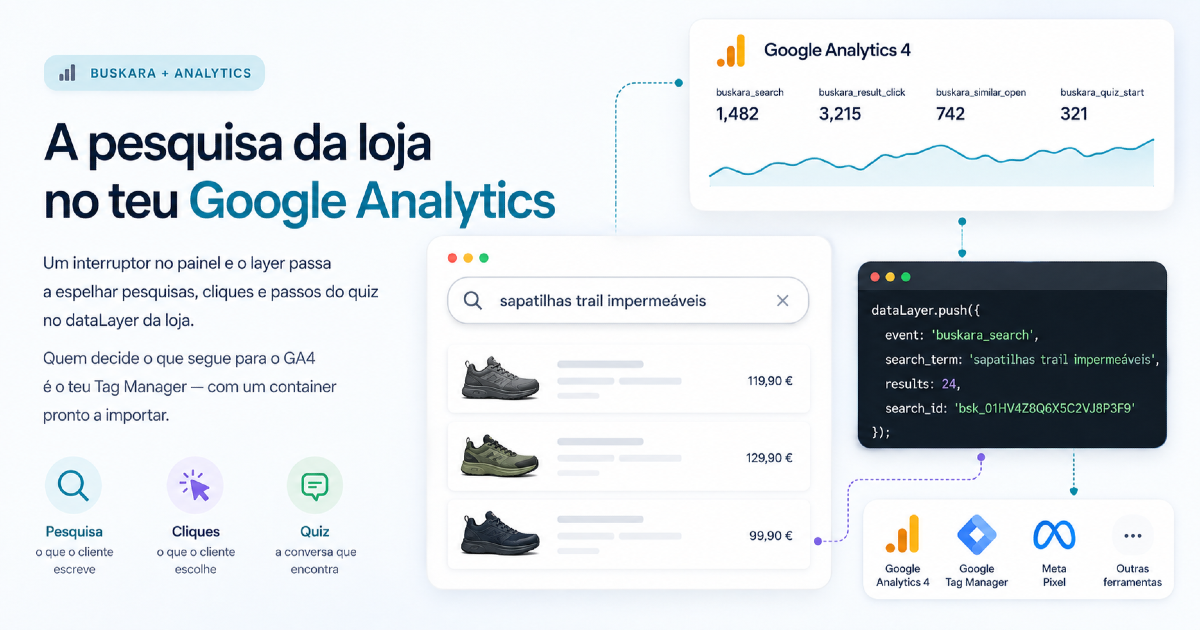
- With the switch on, every search event is delivered to the page itself twice: as a browser event and as a
pushto thedataLayer.- Nothing leaves the page along that route. No cookies are written and no scripts are loaded, and what goes on to GA4 is decided by the store's Tag Manager.
- The most useful event is the least glamorous one: a search with zero results, recorded with the term the person typed.
The search dashboard shows the terms, the clicks and the searches that end in nothing. It's the right picture for tuning the search, and it's the wrong picture for answering a question that always comes up: and in Google Analytics?
The question is legitimate and it isn't about stubbornness. A search tool with a report of its own is a tool nobody compares with anything, and the store's campaigns, audiences, funnels and conversions live in GA4. What doesn't get in there stays out of the accounts the business does, and a tool with a report of its own is a tool nobody compares with anything.
What changes when you turn it on
With the Send events to the store analytics switch on in the store's record, every search event starts being delivered to the page itself, twice and in two forms. It applies to any supported platform, including the PrestaShop search module:
- as a browser event, with names along the lines of
buskara:search, for anyone who wants to listen for them with three lines of JavaScript; - as a
pushto thedataLayer, with names along the lines ofbuskara_search, which is the format Google Tag Manager expects.
It's worth underlining what doesn't happen. This route writes no cookies, loads no scripts and sends nothing outside the page. It puts the information on the store's table and gets out of the way. With the switch off, the dataLayer stays exactly as it was.
The events
| Event | When it fires | Parameters |
|---|---|---|
buskara_open |
The search opens | none |
buskara_search |
A search settles, and not on every keystroke | search_term, results, search_id |
buskara_result_click |
Click on a result | item_id, item_name, price, brand, index, search_term, search_id |
buskara_add_to_cart |
Add to cart in a session that searched | item_id, item_name, price, brand, quantity, search_term, search_id |
buskara_similar_open |
The similar products panel opens | item_id, item_name, search_term, search_id |
buskara_quiz_* |
Each step of the assistant: start, answer, going back, product click, handover to a person, message, checkout | type, slug, step, plus the step's extras |
Two notes about the table.
The search_id is the same identifier the dashboard uses. It's what lets you take a number from GA4 and go and check it against the same number on the other side, instead of arguing about which of the two tools is wrong.
The buskara_add_to_cart counts the add to cart of a session that searched, whether it comes from the search's button, from the assistant or from the store's own button after a search. It's deliberately generous, and it has to be read that way: it's search influence, not tight attribution. Tight attribution is done on the other side, as explained in people who search buy more.
Why buskara_search doesn't fire on every keystroke
Because a typed search isn't one search per letter, and a report that confuses the two is worse than no report at all.
Typing "headphones" produces a dozen intermediate states, and only the last one is what the person meant to search for. If they all counted, the store's "most searched" would be half-words nobody typed on purpose, and the rate of searches with no results would be a number invented by the speed at which each visitor types.
That's why the event waits for the typing to settle. It's a decision with consequences: GA has no way to retract an event once sent, and a number that fills itself up can't be cleaned afterwards.
Turning it on, in three steps
- Download the ready-made container from the dashboard and import it into Tag Manager. It brings the variables, the triggers and the GA4 tags already assembled. The full table of events and parameters lives in the guide to events in GTM and GA4.
- Open the Measurement ID variable and replace the example value with the store's, which you'll find in GA4 under Admin → Data streams.
- In Preview, run a search on the store and confirm the events arrive. Then, Submit.
Without Tag Manager, the browser events serve the same purpose with very little code:
document.addEventListener('buskara:search', function (e) {
  gtag('event', 'buskara_search', e.detail);
});
Consent is the store's decision
The imported tags come with no consent state set, on purpose.
It isn't an omission to be fixed: it's the recognition that the consent policy belongs to the store and not to a search supplier. The gating is done in the container's own rules, with the same mechanism as any other tag. A supplier that decided this on your behalf would be taking on a responsibility that legally still sits with whoever owns the store.
The dataLayer route itself writes no cookies and identifies nobody. What needs consent is whatever the store decides to do with it next.
And Microsoft Clarity
There's a second switch, independent of the first, for stores already using Microsoft Clarity. With it on, the same events are delivered to whatever Clarity is on the page, and each session gets tagged with two labels: the term searched and the product name.
It's the labels that matter, more than the events, because they're what lets you filter session recordings and heatmaps by what people searched for. Watching half a dozen recordings of people who looked for a term and left without clicking on anything explains more than that term's column in a report.
Two honest limitations: Clarity doesn't receive parameters on events, which is down to the tool and not to this integration, hence the labels; and the search never loads the Clarity script, so without it already on the page the switch does nothing.
Pros and cons of mirroring into the store's analytics
| For | Against |
|---|---|
| Search starts appearing next to the campaigns and the conversions, in the place where the budget is decided | More events in GA4, and a badly kept container gets worse |
The search_id lets you cross-check the two reports instead of picking one |
Two sources of numbers invite arguments about which is right |
| Audiences and remarketing can start using search behaviour | Search behaviour is sensitive data in certain catalogues, and forces you to think about consent |
| It works with no new cookies and no additional scripts from us | It needs someone who knows their way around Tag Manager, even with the container ready-made |
| Searches with no results get into the reports of the people who decide what to buy | An event that fires too often ruins the history and can't be deleted |
The report worth building first
If there's only time for one, it's this: buskara_search filtered by results = 0, with search_term as the dimension.
It's the list of what visitors looked for and the store didn't serve, written in their words. In the search dashboard it already exists, with classification by type of problem and an estimate of what can be recovered. What changes by having it in GA4 as well is the company it keeps: it can now be crossed with traffic source, and the question "which campaign is bringing in people looking for what we don't have" stops being rhetorical.
The subject has an article of its own, with the four causes and what to do about each, in searches with no results are the shopping list nobody reads.
Frequently asked questions
How do I get internal search into Google Analytics 4?
By turning on event sending in the store's record and importing the Tag Manager container the dashboard provides. The events reach the store's dataLayer and it's Tag Manager that forwards them to GA4, with whatever consent rules the store already has.
Do these events write cookies or track visitors?
This route doesn't. The events are delivered to the page itself and nothing else leaves it. Cookies and identification are what the GA4 tags do afterwards, under the rules of the store's container, as with any other tag.
Why doesn't GA4's search count match the dashboard's?
Almost always because of consent and blockers. The dashboard counts the searches that reached the service; GA4 counts the ones the tags managed to send. The search_id is on both sides, and it's what you use to investigate a difference instead of guessing.
Is this worth it if the store already has the search dashboard?
It is if the marketing decisions are taken in GA4, which is the case for most. The dashboard is better for tuning the search; GA4 is better for comparing it with everything else the store does. They don't compete.
What is the search_id?
An identifier assigned to each search, present in the events and in the dashboard reports. It's there to tie a click, an add to cart or a conversation to the specific search that started it, instead of grouping them by the typed term alone.
Can I use this with Microsoft Clarity instead of Google Analytics?
You can, and they're independent switches: one, the other, or both. Clarity gives you something GA4 doesn't, which is watching the session recording of someone who searched a term, and it doesn't give parameters on events, which is what GA4 does better.
Was this article useful?
Thank you.
Up next
Hiding out-of-stock products looks like the obvious decision and is usually the wrong one. What shoppers do when they ru...
Search · 10 min read The Buskara search app comes to Shopify storesA Shopify search app that installs like any other app, with no code and no tokens. The catalogue reaches the index in re...
Conversion · 12 min read Searches with no results are the shopping list nobody readsAn empty search is the only place where the customer writes down what they wanted to buy and didn't find. Four causes ex...
We only write when we have something to say
Get new articles on search, conversion, e-commerce and what we learn from real data.