In short
A search with no results is the only place where the customer writes, in their own words, what they wanted to buy and couldn't.
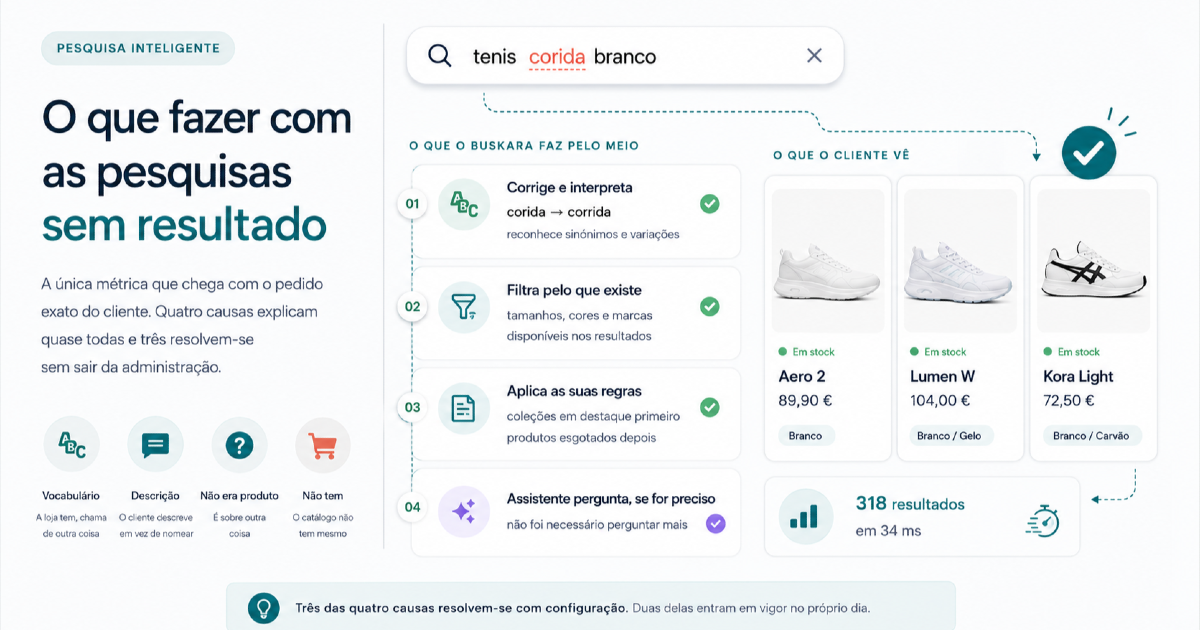
Four causes explain almost all of them: the store has the product under another name, the customer describes instead of naming, the question wasn't about a product, or the store really doesn't have it.
Only the last one forces you to buy anything. The other three are solved with configuration, and two of them take effect the same day.
There's no universal percentage to hit. What matters is the direction yours takes over a few weeks, and whether somebody is reading the list.
Everybody knows their store's conversion rate. Few merchants know off the top of their head what percentage of the searches on their own site ends on an empty screen. That's a shame, because it's the only metric that arrives with the exact text of the request attached: the customer wrote, in their own words, what they expected to find.
This article is about what to do with that list. Not about the percentage itself, which varies too much between catalogues to serve as anybody's target.
The number nobody looks at
An empty search is almost never a fault. It's a vocabulary mismatch, a question that wasn't about products, or demand the store doesn't serve yet. What makes it different from the other metrics is that the action to take comes already written into the data itself.
It's worth comparing this metric with the ones that usually sit on any store's dashboard:
| Metric | What it answers | Who can act on it |
|---|---|---|
| Conversion rate | Whether the whole thing works | Almost nobody, on their own |
| Bounce rate | Whether the landing page matches the expectation | Marketing |
| Most viewed products | What's already being found | Buying, to restock |
| Searches with no results | What demand exists and isn't being served | Whoever writes product pages and whoever buys |
The last row is the only one where the data already comes with the exact text of the request. There's nothing to interpret: it's written down.
What should already have happened before a zero
A zero is only information once the engine has tried everything within its reach. Before returning nothing, a search should go through accent normalisation, typo tolerance and the handling of what's still half typed. Somebody who writes "tenis" isn't asking for a product the store hasn't got, and that distinction is settled before the term reaches the list. The subject has traps of its own, dealt with in why typo correction can't be silent.
This has an awkward consequence. A very low rate isn't automatically good news: a store that never returns a zero is usually a store that returns just anything, and an irrelevant result misleads the visitor for longer than an honest screen does.
Four causes, and what each one costs to fix
Once the noise is cleared out, what's left almost always fits one of these four cases. It's worth telling them apart before acting, because three are solved without leaving the admin and one means talking to suppliers.
| Cause | How you recognise it in the list | What fixes it | When it takes effect |
|---|---|---|---|
| Vocabulary | The term repeats, and by hand you find a product that fits | Synonyms, or the vocabulary on the product page | Straight away |
| Description instead of name | Sounds like a sentence, not like a product name | Assistant, intent pages | As soon as it's switched on |
| It wasn't about a product | Shipping, returns, tracking, opening hours | Indexed content, knowledge base, redirect | Straight away, in the case of the redirect |
| The store hasn't got it | A specific name that doesn't exist in the catalogue | Buying decision | Supplier lead time |
The store has it, but calls it something else
It's the most frequent cause and the cheapest. The catalogue says "running shoe" and the customer writes "trainers for running". The product is there, in stock, waiting for a word nobody wrote on it.
It has two variants, and they're fixed in different ways:
the customer's word doesn't exist in any field of the product. The short route is a synonym, which takes effect without a reindex; the long route, and the better one, is to put that word on the product page, as discussed in your catalogue is written for the supplier;
the word does exist, but in a field that isn't indexed or that carries zero weight. Here no dictionary is missing, configuration is, and the place to check is products that don't show up.
The sign is easy to recognise: the term turns up dozens of times, written in slightly different ways, and when you look for it by hand in the catalogue you always find something that fits.
It isn't a problem of small stores or badly kept catalogues. In the 2026 revision of the Baymard Institute search benchmark, which reviews more than 170 e-commerce sites and apps, 20% have problems with product-type searches and 12% have problems even when the visitor writes the exact name of the item.
The customer describes, doesn't name
"Something to hang bikes on in the garage." No engine that compares words gets this one right, because the customer used none of the words on the product page. They used the function, the context, the compatibility or the problem they want to solve.
These are the searches catalogues serve worst, and Baymard measures them separately: 43% of the sites reviewed have problems with use-case searches, 44% with compatibility ("does it fit my model?"), 39% with features and 37% with symptoms.
This cause is the reason the assistant exists. Not to answer everything, but for the moment when the intent is clear and the vocabulary doesn't match. A question back ("for indoors or outdoors?") opens the way to the product, with the answers turning into filters over the real catalogue.
For the terms that repeat month after month, there's a second answer that depends on no technology at all: a page built for that intent, with the products that fit and the text that explains the choice. You win the internal search and the external one at the same time.
It isn't a search, it's a question
"How long does delivery take." "Can I return this." "Where is my order." The search box is where people write, and there's no point getting annoyed about it: in Baymard's self-service testing, 34% of participants tried to look for content that wasn't a product, and it's the category of search that sites serve worst of all, with 66% showing problems.
There are three possible answers, and all three can coexist:
index the blog and the store's pages, and the answer starts appearing in the results themselves, in a separate block that doesn't take the products' place (articles and content);
write the answer once for whatever isn't published on any page, such as the support opening hours or the lead time that changes in August (knowledge base);
redirect the term to the page that answers it, which is the quickest route for "shipping" or for the name of a campaign (redirects by term).
The store really hasn't got it
It's the most valuable cause and the only one that calls for a business decision. When dozens of people a month look for "children's wellies" in a store that only sells adult sizes, that isn't a search problem. It's documented demand from people who were already on the site, willing to pay.
The recommendation is modest: look at that list once a month with whoever does the buying. Not to order everything on it, but to know where demand already exists before the store serves it. It's information that keyword tools estimate and this list records, because here there's no estimate at all: these are requests that happened.
The fifth one, which only shows up on the chart
There's a case you can't see in the sorted list, only in how it moves: terms that return zero in a spike. A campaign, an influencer, a product announced before it went live.
An empty term that didn't exist last week is rarely a configuration problem. It's new traffic looking for something specific, and the cost of leaving it unanswered is proportional to what you spent bringing it in.
Pros and cons of working through the list
Before changing the team's process, it's worth being honest about both sides.
| In favour | Against |
|---|---|
| Every fix has an immediate, measurable effect on the same term | It calls for a weekly habit, and habits die in the first busy week |
| It serves demand that already exists, without spending on traffic acquisition | It doesn't create new demand: it only serves what's already there |
| Three of the four causes cost no money at all | The fourth one can mean buying stock that doesn't move |
| It improves the search and the product pages at the same time | The customer's vocabulary changes with the seasons and has to be revisited |
| The list gives concrete arguments to whoever negotiates with suppliers | A long list is demoralising: it's best to tackle it in order of return |
Where to start, in order
Sort the terms by what they're worth, and not by date or by raw volume. Thirty searches for an expensive product deserve more attention than three hundred for a two-euro item.
For the first five, ask the simple question: does the store have this under another name? If it does, it's vocabulary, and it gets fixed now.
Read the ones left over out loud. If they sound like a sentence, the route is the assistant or a page built for that intent. If they sound like a customer support question, the route is content or a redirect.
The rest is demand waiting to be served. Take that list, with numbers, to the next buying conversation.
Mark off what's been dealt with and come back the following week. The list renews itself, and it's that renewal that shows whether the previous week's fixes worked.
Twenty minutes a week is enough. What doesn't work is looking every three months: by then the list has hundreds of terms, nobody reads it to the end, and the fixes reach demand that has already gone.
What Buskara does with this list
The list exists in any search engine. What's usually missing is having it in front of whoever can act on it, already classified, and it's one of the reasons Buskara exists.
In the admin, empty terms appear in three places, from the most immediate to the most actionable: the last 30 days indicator on the Overview, with the change and the terms beside it; the analytics screen, with a window of your choosing, a filter by device and export; and the optimisation screen, where each term appears classified by type of problem and the list is sorted by the estimate of what's recovered per month.
There are two more pieces that spare you the boring part. The synonym suggestions come out of the very searches that returned zero and wait for approval, because a wrong synonym starts serving results to people who were looking for something else, and that shows up in no report as a problem. And each term dealt with can be marked as resolved, which turns the screen into an inbox instead of a wall of numbers.
On the visitor's side, a zero is never a blank screen: the message appears, the box and the filters stay to hand and, with recommendations switched on, there's somewhere to carry on. The details of each of these pieces are in the guide on searches with no results.
The part that still has no technical solution is the fourth cause, and just as well: that one is a decision for whoever does the buying, not for the search engine.
Frequently asked questions
What counts as a search with no results?
It's a search that settled and returned zero products. It's counted per search and not per visitor: the same person trying three different wordings leaves three requests unserved, and all three say something about the catalogue's vocabulary. What shouldn't count are the keystrokes and the intermediate states of somebody still typing, because they fill up the number without filling up the list.
What's a normal rate of searches with no results?
There's no point looking for a universal number. The rate depends on the size of the catalogue, the type of product, the number of languages and how much paid traffic comes into the store, and the benchmarks doing the rounds on the internet rarely say how they were measured. The useful number is yours, compared with itself over a few weeks. Zero isn't a target either: it almost always means the engine would rather return just anything than admit it hasn't got it.
Do I fix it with synonyms or rewrite the product pages?
Synonyms first, because they solve it today and break nothing. Rewriting the product pages is worth it for the terms that repeat month after month, because it also improves what external search engines find. The two don't compete: the synonym is the right sticking plaster, the product page is the cure.
Should I show something when the search finds nothing?
Yes, and never just "no results". The screen should offer a route: the closest products, the related categories, or the move into a conversation that asks what the person is looking for. It's the step most sites get wrong, with close to half of those reviewed by Baymard giving no way at all to recover from an empty search, and the Nielsen Norman Group sums the rules up in three: say clearly that there are no results, offer starting points, and never make fun of whoever typed.
Are searches with no results any use for buying decisions?
They are, with care. A term asked for dozens of times a month is a sign of real demand, but it says nothing about margin, supplier lead time or turnover. The list is there to bring the conversation to the table with numbers instead of hunches, not to replace the decision of whoever does the buying.
Can a store with little traffic get anything out of this list?
It can, though more slowly. With few searches a week, percentages say nothing and individual terms say everything: twenty empty searches can be twenty opportunities you can identify by hand. What changes is the interval, not the method.
Was this article useful?
Thank you.
Up next
Hiding out-of-stock products looks like the obvious decision and is usually the wrong one. What shoppers do when they ru...
Assistant · 8 min read An assistant that can't say "I don't know" is a problemHow we confined the answers to the catalogue and the store's own pages, and why we'd rather hand over to a person than r...
Conversion · 7 min read People who search buy more. That doesn't mean what it looks likeThe correlation is real and it shows up in every store. The conclusion people draw from it is usually wrong, and it lead...
We only write when we have something to say
Get new articles on search, conversion, e-commerce and what we learn from real data.